Interfacing Python and MongoDB
Why this matters
MySQL stores data in tables. MongoDB stores data as documents. That changes how you model data, query data, and move data into Python.
This lesson teaches the practical workflow:
connect to MongoDB, choose a database and collection, insert documents, query documents, project fields, sort/limit results, and convert selected documents to Pandas when analysis needs it.
The notebook uses movie JSON data and an Airbnb dataset. The important part is not every cleaning cell. The important part is learning how document-shaped data flows between MongoDB, PyMongo, and Pandas.
Mental model
MongoDB is a document database.
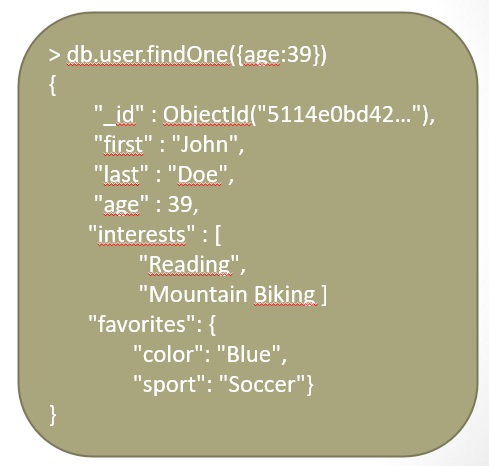
A document is similar to a JSON object:
Unlike a relational row, a document can naturally contain nested objects and arrays. That is MongoDB's main comfort zone: flexible, nested, semi-structured data.
Core ideas
- MongoDB stores JSON-like documents in collections.
- A collection is roughly comparable to a table, but documents in the same collection do not need identical fields.
- PyMongo is the common Python driver for MongoDB.
MongoClientconnects Python to the MongoDB server.insert_oneinserts one document;insert_manyinserts many documents.findreturns a cursor, not a plain list.- A query is usually a Python dictionary.
- A projection selects which fields to include or exclude.
- Operators such as
$gt,$exists, and$allexpress richer conditions. - Convert MongoDB results to Pandas only after selecting a manageable, analysis-ready subset.
Walkthrough
Documents vs relational rows
In a relational database, related information is often split across tables.
In MongoDB, related information can be embedded inside one document.
listing = {
    "name": "Small apartment near the center",
    "address": {
        "country": "Spain",
        "market": "Barcelona"
    },
    "amenities": ["Wifi", "Kitchen", "Washer"],
    "review_scores": {
        "review_scores_rating": 92
    }
}
This shape would be awkward as one flat SQL row. In MongoDB, nested fields and arrays are normal.
Connect with PyMongo
Install the driver:
Then connect:
import os
import pymongo

connection_string = os.environ.get(
    "MONGODB_URI",
    "mongodb://localhost:27017/",
)

client = pymongo.MongoClient(connection_string, serverSelectionTimeoutMS=3000)
client.admin.command("ping")
ping is a quick connection check. If it fails, check whether MongoDB is running, whether the host/port are correct, and whether credentials are valid.
The source notebook uses a classroom Docker connection string. Treat those credentials as local demo credentials, not a habit for real projects.
Choose database and collection
MongoDB creates databases and collections lazily. They usually appear once data is inserted.
Insert one document
record = {
    "title": "MongoDB and Python",
    "description": "A document database example",
    "tags": ["mongodb", "database", "NoSQL"],
    "viewers": 104,
}

result = collection.insert_one(record)
print(result.inserted_id)
If you do not provide _id, MongoDB adds one. _id is the document's unique identifier, similar in purpose to a primary key.
Insert many JSON documents
import json

with open("Data/movies.json", encoding="utf-8") as file:
    movies = json.load(file)

if isinstance(movies, list):
    collection.insert_many(movies)
else:
    collection.insert_one(movies)
This matches the notebook's movie example. JSON maps naturally into MongoDB documents.
Find documents
Query objects are dictionaries.
Important: find returns a cursor. It does not immediately give you a printed list. You iterate over it, limit it, sort it, or convert it when appropriate.
Count, limit, and sort
Sort direction 1 means ascending. Sort direction -1 means descending.
Use query operators
MongoDB query operators are written inside dictionaries.
This finds titles alphabetically greater than "S".
For arrays:
This finds documents whose amenities array contains both "Wifi" and "TV".
For nested fields, use dot notation:
query = {
    "address.country": {"$in": ["Italy", "Spain"]},
    "review_scores.review_scores_rating": {"$gte": 90},
}
Dot notation lets you query inside embedded documents.
Use projection to control output
The second argument to find is a projection: which fields to include or exclude.
projection = {
    "_id": 0,
    "listing_url": 1,
    "name": 1,
    "price": 1,
    "address.country": 1,
}

results = collection.find({}, projection).limit(10)
This is the MongoDB version of saying:
Do not send me every field. Send only the fields I need.
That matters because documents can be large and nested.
Convert selected documents to Pandas
import pandas as pd

cursor = collection.find(
    {"year": 1900},
    {"_id": 0, "title": 1, "year": 1, "genres": 1},
)

df_movies = pd.DataFrame(list(cursor))
This is useful, but use it carefully. list(cursor) loads all selected documents into memory. Filter and project first, then convert.
For deeply nested documents, Pandas may create columns that still contain dictionaries or lists. You may need explicit flattening:
That flattening work is a major part of the Airbnb section in the notebook.
Explained code examples
Safe connection helper
import os
import pymongo


def connect_to_mongodb():
    uri = os.environ.get("MONGODB_URI", "mongodb://localhost:27017/")
    return pymongo.MongoClient(uri, serverSelectionTimeoutMS=3000)
What this teaches:
- keep the connection string outside source code when it contains credentials
- set a timeout so connection problems fail quickly
- return a client that can access multiple databases
Query Airbnb-style nested fields
query = {
    "amenities": {"$all": ["Wifi", "Washer"]},
    "address.country": {"$in": ["Italy", "Spain"]},
    "review_scores.review_scores_rating": {"$gte": 90},
}

projection = {
    "_id": 0,
    "name": 1,
    "listing_url": 1,
    "address.country": 1,
    "review_scores.review_scores_rating": 1,
    "price": 1,
}

results = db.listingsAndReviews.find(query, projection).limit(10)
What this teaches:
- arrays can be queried with
$all - nested fields can be queried with dot notation
- comparison operators such as
$gtework inside query dictionaries - projection keeps the result readable
MongoDB to Pandas, but only after reduction
This is the bridge to analysis. MongoDB handles the document query. Pandas handles the tabular analysis after you have a reasonably sized result.
Common traps
MongoDB is just SQL with different syntax.
MongoDB is document-oriented. Think in documents, embedded fields, arrays, and collections rather than normalized tables first.
Schema-less means no structure.
MongoDB is flexible, but your application still depends on expected fields and shapes. Flexible schema is not a license for messy data.
find returns the data.
find returns a cursor. You need to iterate over it, limit it, or convert it.
Convert the whole collection to Pandas.
Filter and project first. Large collections and nested documents can overwhelm memory or create awkward DataFrames.
Projection is optional detail.
Projection is how you keep document queries readable and efficient. Ask for only the fields you need.
Arrays and nested objects behave like flat columns.
They do not. Use array operators and dot notation, then flatten deliberately if you need a DataFrame.
Document databases never have relationships.
They can reference related data, but the modeling style usually prefers embedding data that is read together.
Check yourself
What is the MongoDB equivalent of a table?
A collection. It contains documents.
What is a MongoDB document?
A JSON-like record made of fields, values, nested objects, and arrays.
What does PyMongo's MongoClient represent?
A client connection object that lets Python access MongoDB databases and collections.
What does find return?
A cursor over matching documents, not an immediate plain list.
Why use projection in find?
To include only the fields needed for the task and avoid transferring bulky documents.
How do you query a nested field such as country inside address?
Use dot notation, for example "address.country": "Spain".
When should MongoDB results become a Pandas DataFrame?
After the MongoDB query has filtered and projected the data to a manageable analysis-ready subset.
What is the main modeling difference from MySQL?
MySQL usually normalizes data across related tables; MongoDB often embeds related data inside flexible documents.
Source anchors
- Source file:
notebooks/Module2/03-Interfacing Python and MongoDB.ipynb - Source datasets:
notebooks/Module2/Data/movies.json,notebooks/Module2/Data/listingsAndReviews.json - Key source concepts: MongoDB document database, PyMongo, connection strings, databases, collections, documents,
_id,insert_one,insert_many,find, cursors,count_documents,limit,sort, query operators, projection, nested fields, arrays, MongoDB to Pandas conversion - Source images:
study-guide/docs/assets/extracted/mongoexample.jpg,study-guide/docs/assets/extracted/mongodb_find.jpg