Introduction to PyTorch
Why this matters
The previous lesson implemented a neural network by hand with NumPy. PyTorch gives you the same core workflow with better tools:
This matters because later lessons build toward language models. Those models are too large and too complex to train comfortably with hand-written NumPy backpropagation.
Mental model
PyTorch is three things at once:
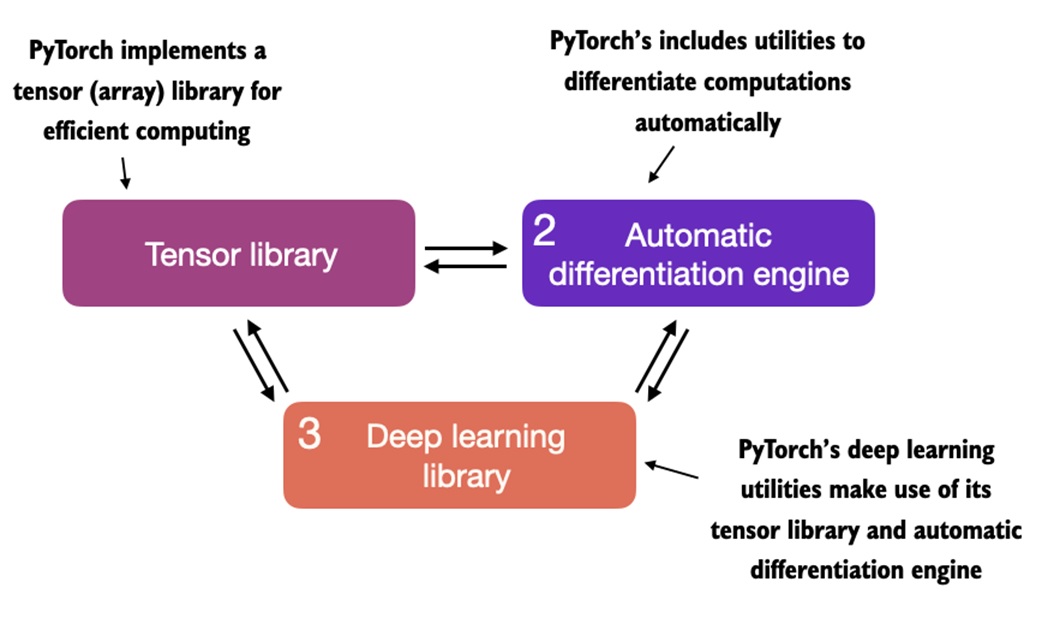
- a tensor library, like NumPy with GPU support
- an automatic differentiation engine, called autograd
- a neural-network toolkit, with layers, losses, optimizers, datasets, and training utilities
The main shift from NumPy is that PyTorch can remember tensor operations and compute gradients automatically.
Core ideas
- A tensor is a numeric array: scalar, vector, matrix, or higher-dimensional block.
- PyTorch tensors can live on CPU or GPU.
- Tensor shape and dtype must match the operation you want to run.
requires_grad=Truetells PyTorch to track operations for gradient computation.loss.backward()computes gradients for trainable parameters.optimizer.step()updates parameters using those gradients.optimizer.zero_grad()clears old gradients before the next update.torch.nn.Moduleis the standard way to define reusable models.Datasetreturns individual examples;DataLoaderbatches, shuffles, and loads them.- During inference, use
model.eval()andtorch.no_grad()ortorch.inference_mode(). - Save learned weights with
state_dict, not by relying on a live Python object.
Walkthrough
Installing and checking PyTorch
The notebook begins with installation and GPU checks.
If this returns True, PyTorch can see a CUDA-capable GPU. If it returns False, the code can still run on CPU, just slower for larger models.
In practice, use the official PyTorch install selector for your operating system and CUDA version. The exact install command changes depending on your machine.
Tensors
Tensors generalize arrays:
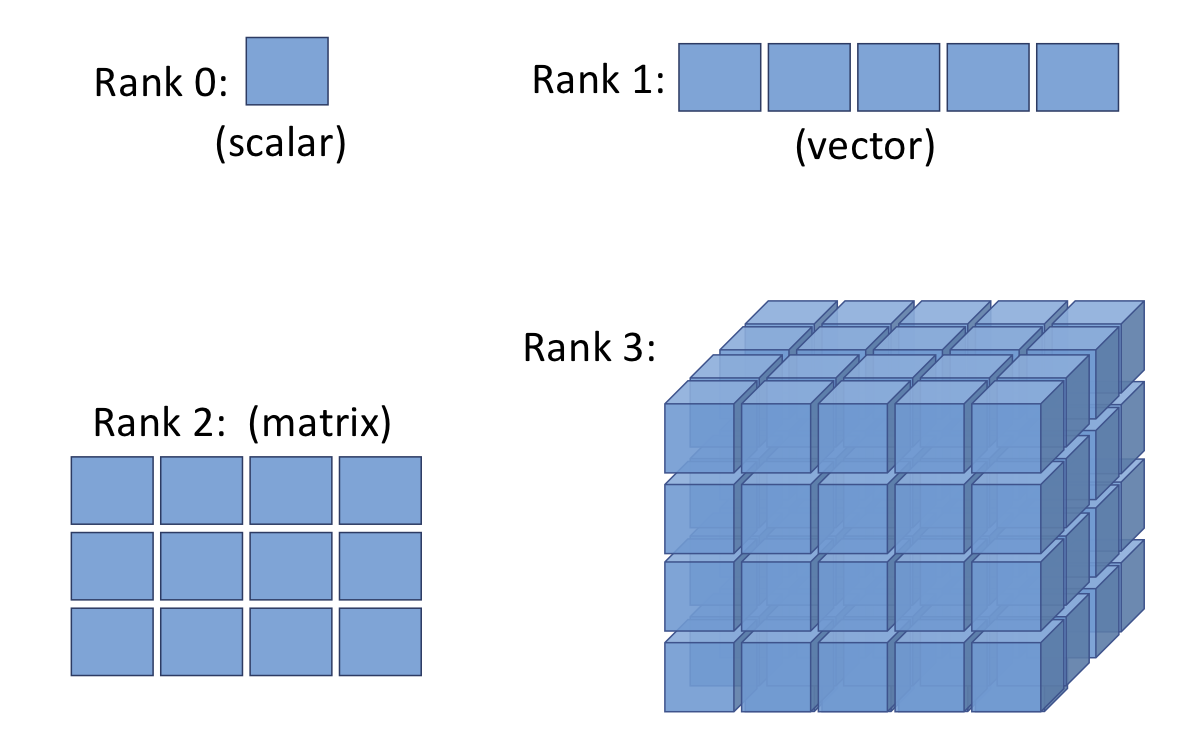
Create tensors from Python lists or NumPy arrays:
import numpy as np
import torch

a = [1, 2, 3]
b = np.array([4, 5, 6], dtype=np.int32)

t_a = torch.tensor(a)
t_b = torch.from_numpy(b)
Create common tensors directly:
For images and deep-learning batches, a common convention is:
For text models, you will often see:
Shape and dtype operations
Most PyTorch errors are shape or dtype errors. The notebook introduces the essential tools:
Use .to(...) to change dtype or device:
Later you will also see:
That moves tensors to CPU or GPU.
Tensor math
PyTorch supports elementwise math, reductions, matrix multiplication, splitting, stacking, and concatenation.
Examples:
product = torch.multiply(t1, t2)
column_means = torch.mean(t1, dim=0)
matrix_product = t1 @ t2.T
row_norms = torch.linalg.norm(t1, ord=2, dim=1)
The pattern to watch:
dim=0 -> operate down rows, one result per column
dim=1 -> operate across columns, one result per row
For classification outputs, this is why torch.argmax(logits, dim=1) means "choose the best class for each example."
Computation graphs
PyTorch builds computation graphs from tensor operations.
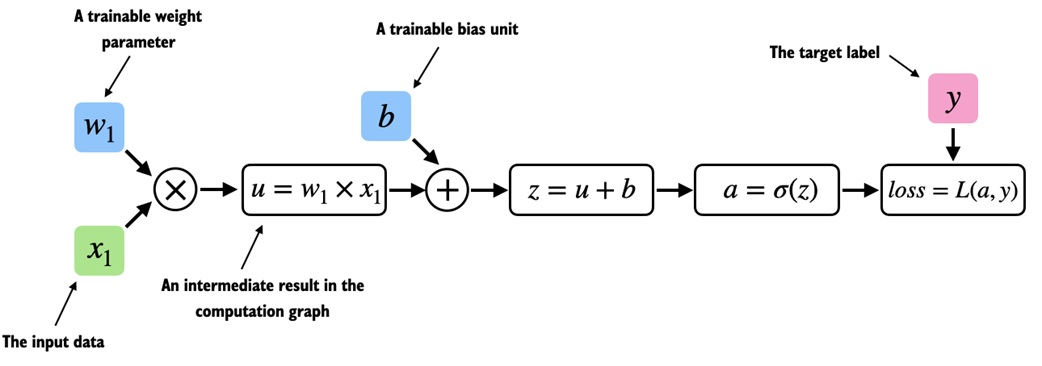
A tiny logistic-regression-like example:
import torch
import torch.nn.functional as F
y = torch.tensor([1.0])
x1 = torch.tensor([1.1])
w1 = torch.tensor([2.2], requires_grad=True)
b = torch.tensor([0.0], requires_grad=True)
z = x1 * w1 + b
a = torch.sigmoid(z)
loss = F.binary_cross_entropy(a, y)
Because w1 and b have requires_grad=True, PyTorch tracks how loss depends on them.
Autograd
Autograd is PyTorch's automatic differentiation system.
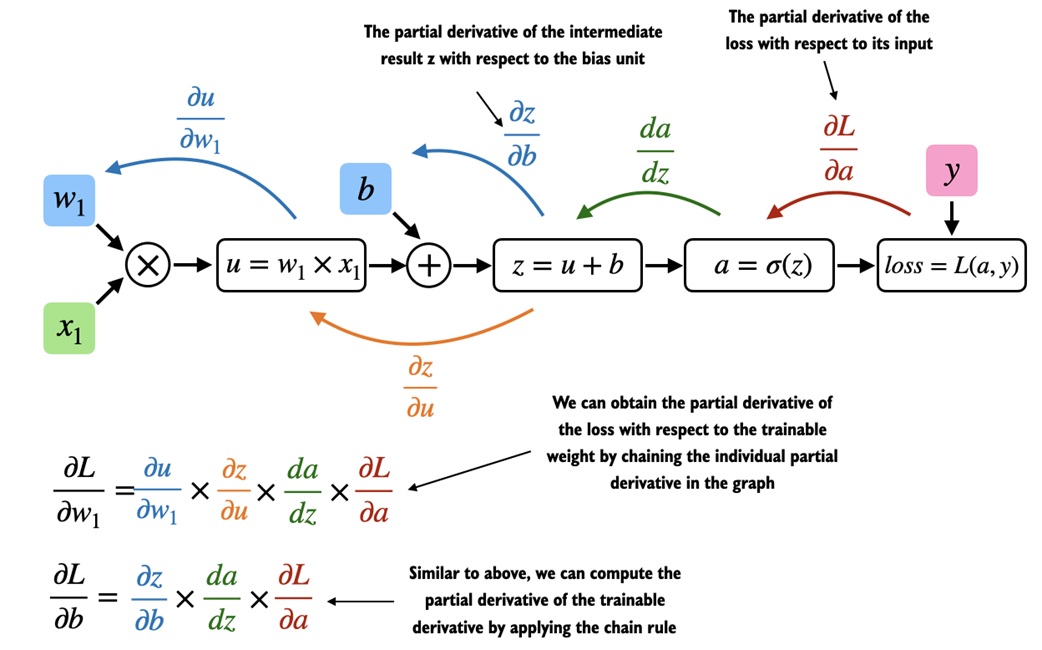
The usual training pattern is:
After backward, each tracked parameter stores its gradient in .grad.
That replaces the hand-written .backward() method from the NumPy MLP lesson.
Defining a model with nn.Sequential
For simple feedforward models, torch.nn.Sequential is concise:
import torch.nn as nn
model = nn.Sequential(
nn.Linear(input_features, 30),
nn.ReLU(),
nn.Linear(30, 15),
nn.ReLU(),
nn.Linear(15, 3),
)
Important: for multiclass classification with nn.CrossEntropyLoss, the model should return raw logits. Do not add Softmax as the final training layer. CrossEntropyLoss applies the needed log-softmax internally in a numerically stable way.
Use softmax later only if you want to display probabilities:
Defining a model with nn.Module
For reusable models, subclass torch.nn.Module.
class NeuralNetwork(nn.Module):
def __init__(self, num_inputs, num_outputs):
super().__init__()
self.layers = nn.Sequential(
nn.Linear(num_inputs, 30),
nn.ReLU(),
nn.Linear(30, 20),
nn.ReLU(),
nn.Linear(20, num_outputs),
)
def forward(self, x):
logits = self.layers(x)
return logits
What this teaches:
__init__defines the trainable layersforwarddefines how inputs flow through the model- you normally do not implement
backward - PyTorch tracks parameters from layers such as
nn.Linear
Count trainable parameters:
Device handling
PyTorch tensors and models must be on the same device.
device = torch.device("cuda" if torch.cuda.is_available() else "cpu")
model = model.to(device)
features = features.to(device)
labels = labels.to(device)
If the model is on GPU but the data is on CPU, operations fail. Move both consistently.
Dataset and DataLoader
The notebook introduces PyTorch's data pipeline:
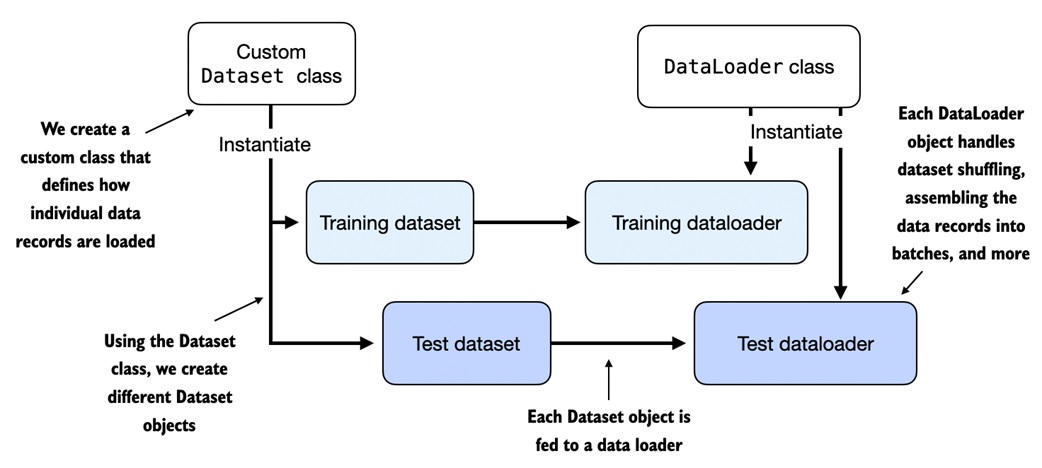
Dataset: knows how to return one exampleDataLoader: turns examples into batches and handles shuffling
A minimal custom dataset:
from torch.utils.data import Dataset

class ToyDataset(Dataset):
    def __init__(self, X, y):
        self.features = X
        self.labels = y

    def __getitem__(self, index):
        return self.features[index], self.labels[index]

    def __len__(self):
        return self.labels.shape[0]
Wrap it in a loader:
from torch.utils.data import DataLoader

train_loader = DataLoader(
    dataset=train_ds,
    batch_size=2,
    shuffle=True,
    drop_last=True,
)
Why this matters:
- batching keeps memory use controlled
- shuffling changes example order each epoch
drop_last=Trueavoids tiny final batchesnum_workerscan parallelize data loading for larger datasets
Training loop
A standard PyTorch training loop has a stable shape:
import torch.nn.functional as F

optimizer = torch.optim.SGD(model.parameters(), lr=0.5)

for epoch in range(num_epochs):
    model.train()

    for features, labels in train_loader:
        features = features.to(device)
        labels = labels.to(device)

        logits = model(features)
        loss = F.cross_entropy(logits, labels)

        optimizer.zero_grad()
        loss.backward()
        optimizer.step()
Read it as:
The order of zero_grad, backward, and step matters.
Evaluation and inference
For evaluation:
model.eval()

with torch.no_grad():
    logits = model(features)
    predictions = torch.argmax(logits, dim=1)
Use model.eval() because layers like dropout and batch normalization behave differently during training and evaluation.
Use torch.no_grad() or torch.inference_mode() because you do not need gradients for evaluation. That saves memory and computation.
Accuracy function
A reusable accuracy function loops over a dataloader:
def compute_accuracy(model, dataloader, device):
    model.eval()
    correct = 0
    total = 0

    with torch.no_grad():
        for features, labels in dataloader:
            features = features.to(device)
            labels = labels.to(device)

            logits = model(features)
            predictions = torch.argmax(logits, dim=1)

            correct += torch.sum(predictions == labels).item()
            total += labels.shape[0]

    return correct / total
This scales better than trying to evaluate an entire large dataset at once.
Saving and loading
The recommended basic pattern is to save the model's state_dict.
Load it into a model with the same architecture:
model = NeuralNetwork(num_inputs=2, num_outputs=2)
model.load_state_dict(torch.load("model.pth"))
model.eval()
state_dict stores learned weights and biases. The class definition still needs to exist when you load those weights.
Common traps
PyTorch tensors can hold arbitrary Python objects like NumPy arrays can.
PyTorch tensors are numeric. Text, categories, and objects need encodings, dictionaries, or embeddings.
Softmax should always be the last model layer.
For training with CrossEntropyLoss, return logits. Apply softmax only for displaying probabilities.
Calling backward() updates the model.
backward() computes gradients. optimizer.step() updates the parameters.
Gradients reset automatically.
They do not. Use optimizer.zero_grad() each update.
CPU tensors and GPU tensors can mix freely.
The model and tensors used in one operation must be on the same device.
Evaluation is just training without labels.
Evaluation should use model.eval() and no-gradient context to get correct behavior and save resources.
A DataLoader is the dataset.
The dataset defines individual examples. The dataloader defines batching, shuffling, and loading behavior.
Check yourself
What does requires_grad=True do?
It tells PyTorch to track operations on that tensor so gradients can be computed during backpropagation.
What is stored in a parameter's .grad attribute?
The gradient of the loss with respect to that parameter after loss.backward() has been called.
Why do we call optimizer.zero_grad() before loss.backward()?
PyTorch accumulates gradients by default. Clearing them prevents old gradients from affecting the current update.
What does optimizer.step() do?
It updates model parameters using the gradients and the optimizer's update rule.
Why should CrossEntropyLoss receive logits?
It combines log-softmax and negative log-likelihood internally for numerical stability.
What is the difference between Dataset and DataLoader?
A Dataset returns individual examples. A DataLoader batches, shuffles, and iterates over those examples.
Why use model.eval() during evaluation?
It switches layers such as dropout and batch normalization into evaluation behavior.
What does state_dict save?
It saves the learned parameter tensors, such as weights and biases, for the model architecture.
Source anchors
This lesson rewrites the main ideas from 11-Introduction to PyTorch.ipynb:
- PyTorch installation and CUDA check
- tensors, shape, dtype, and tensor operations
- computation graphs and autograd
- manual gradient examples with
requires_grad - simple MLPs with
nn.Sequential - reusable models with
torch.nn.Module - device handling for CPU/GPU
DatasetandDataLoader- PyTorch training loop
- inference, accuracy computation, and save/load with
state_dict