Instruction Finetuning
Why this matters
Pretraining teaches a model to continue text. Instruction finetuning teaches it to respond to tasks.
That is the difference between:
and:
Instruction: Rewrite this sentence in passive voice.
Input:       The chef cooks the meal every day.
Response:    The meal is cooked every day by the chef.
This lesson shows how to turn a pretrained GPT-style model into a simple instruction follower.
Mental model
Instruction finetuning is supervised next-token training on formatted examples.
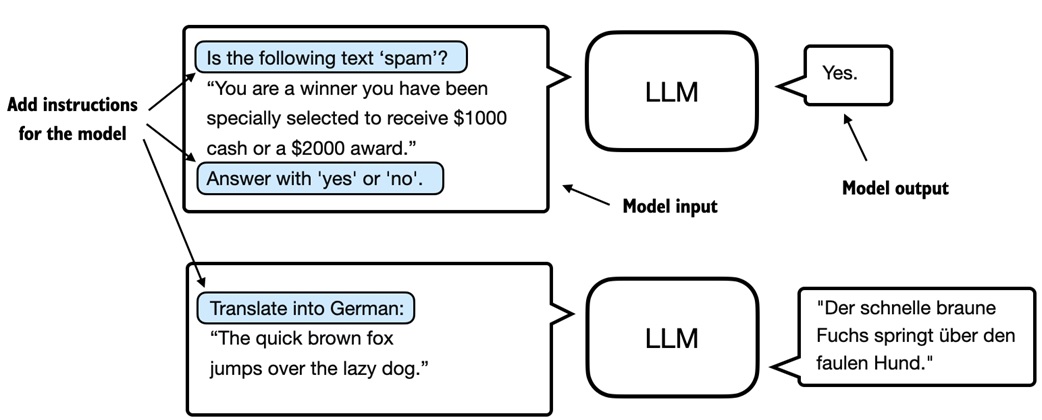
Each training example is written as a prompt plus the desired answer:
The model still learns by predicting the next token. The new part is the data format: the next tokens now represent helpful responses to tasks.
Core ideas
- Instruction finetuning is supervised learning for language models.
- Each example contains an instruction, optional input, and expected output.
- The notebook uses Alpaca-style formatting with section markers.
- The full prompt and response are tokenized as one sequence.
- Targets are shifted one token forward, just like in pretraining.
- Batches need padding because instruction examples have different lengths.
- The custom collate function pads within each batch, not across the whole dataset.
- Padding target tokens are replaced with
-100so cross-entropy ignores them. - One end-of-text token is kept so the model can learn when to stop.
- A larger GPT-2 medium model is used because GPT-2 small gives weak instruction-following quality.
- Evaluation is harder than spam classification because generated responses are not fixed labels.
- The notebook uses another local model through Ollama to score generated answers.
Walkthrough
The three-stage plan
The notebook breaks instruction finetuning into three broad stages:
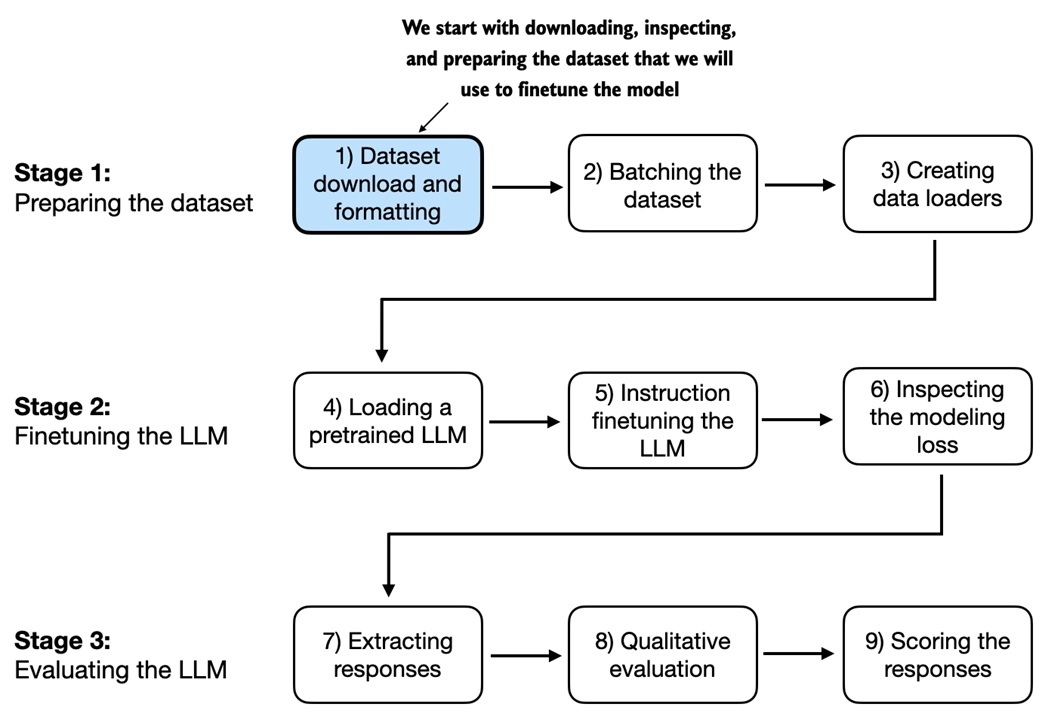
1. Prepare instruction-response data
2. Load and finetune a pretrained model
3. Generate and evaluate responses
The difficult part is not the optimizer. The training loop is mostly reused from pretraining. The difficult part is preparing examples so that the model learns the right behavior and the loss ignores meaningless padding.
Instruction data
The dataset has about 1100 examples. Each item is a dictionary with fields like:
{
  "instruction": "Rewrite the sentence in passive voice.",
  "input": "The chef cooks the meal every day.",
  "output": "The meal is cooked every day by the chef."
}
Some examples have an empty input field. That is normal:
{
  "instruction": "Name three uses of version control.",
  "input": "",
  "output": "Tracking changes, collaborating with others, and reverting mistakes."
}
The dataset is split into:
Prompt formatting
Instruction finetuning needs a consistent text format. The notebook uses Alpaca-style formatting:
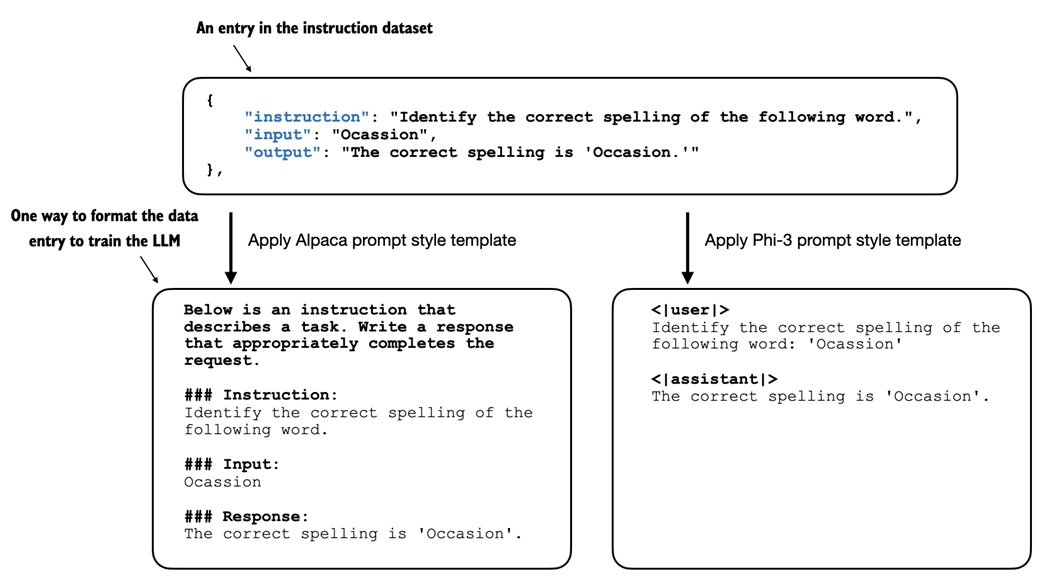
The helper function builds the model input:
def format_input(entry):
    instruction_text = (
        "Below is an instruction that describes a task. "
        "Write a response that appropriately completes the request."
        f"\n\n### Instruction:\n{entry['instruction']}"
    )

    input_text = f"\n\n### Input:\n{entry['input']}" if entry["input"] else ""
    return instruction_text + input_text
The desired response is appended during training:
response_text = f"\n\n### Response:\n{entry['output']}"
full_text = format_input(entry) + response_text
The model sees one text sequence containing the instruction and the answer.
Dataset class
The InstructionDataset pre-tokenizes every formatted example:
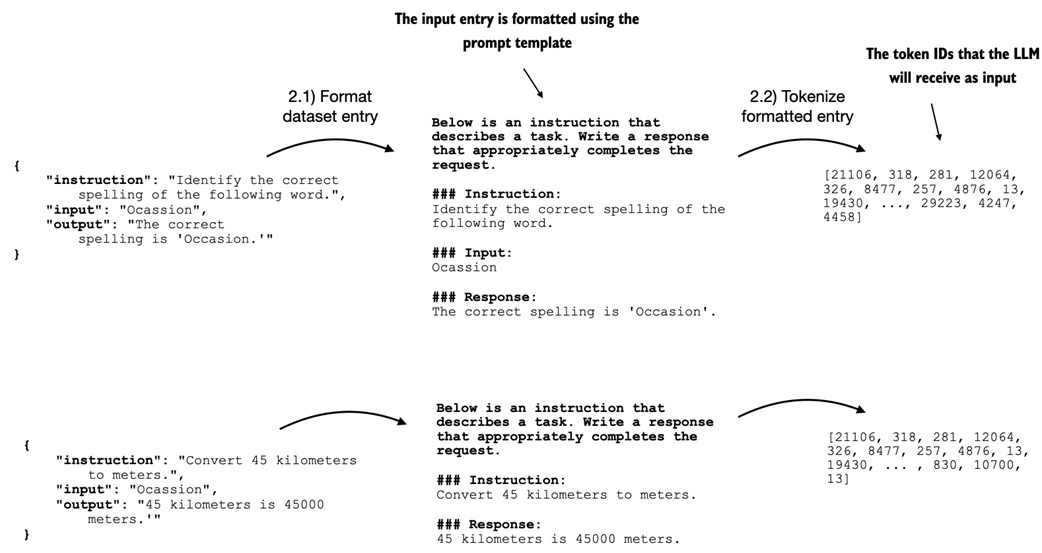
class InstructionDataset(Dataset):
    def __init__(self, data, tokenizer):
        self.data = data
        self.encoded_texts = []

        for entry in data:
            full_text = format_input(entry) + f"\n\n### Response:\n{entry['output']}"
            self.encoded_texts.append(tokenizer.encode(full_text))

    def __getitem__(self, index):
        return self.encoded_texts[index]

    def __len__(self):
        return len(self.data)
This class returns only token IDs. The targets are created later by the collate function.
Why custom batching is needed
Instruction examples have different lengths. One response might be short; another might contain a paragraph.
A normal tensor batch needs equal lengths, so the notebook uses a custom collate function:
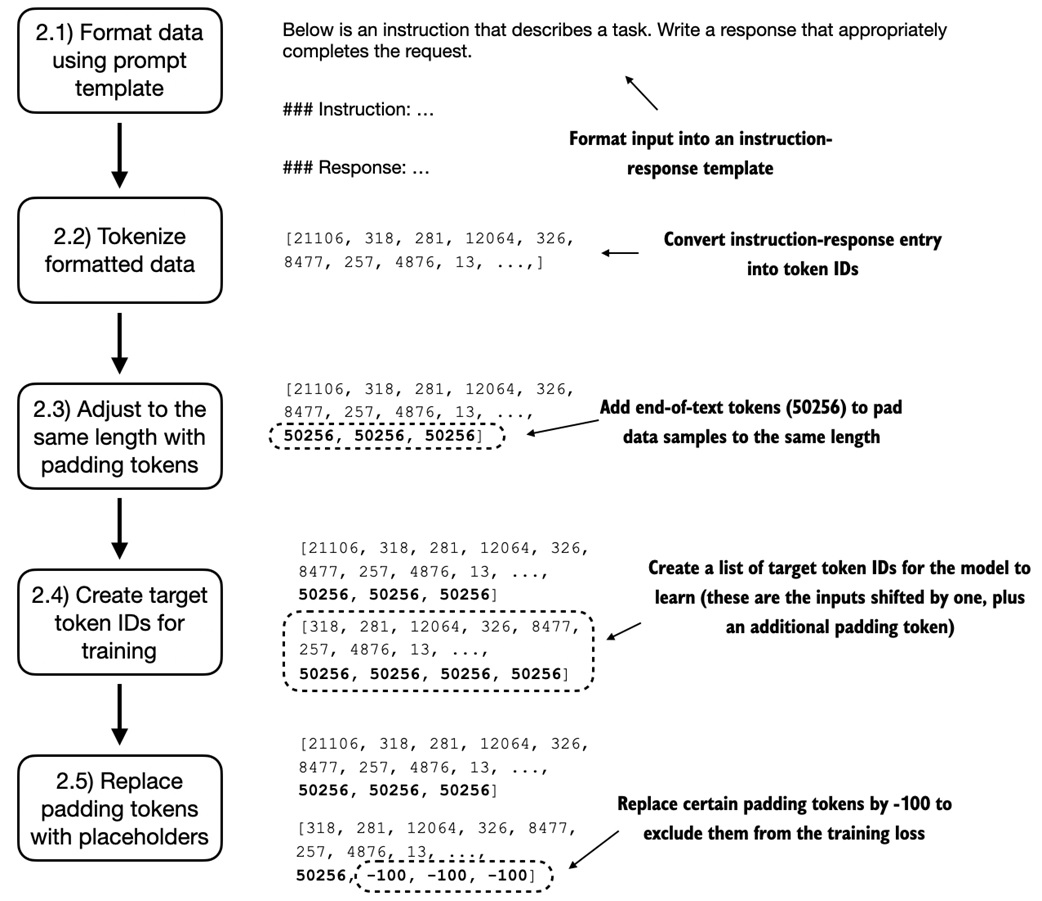
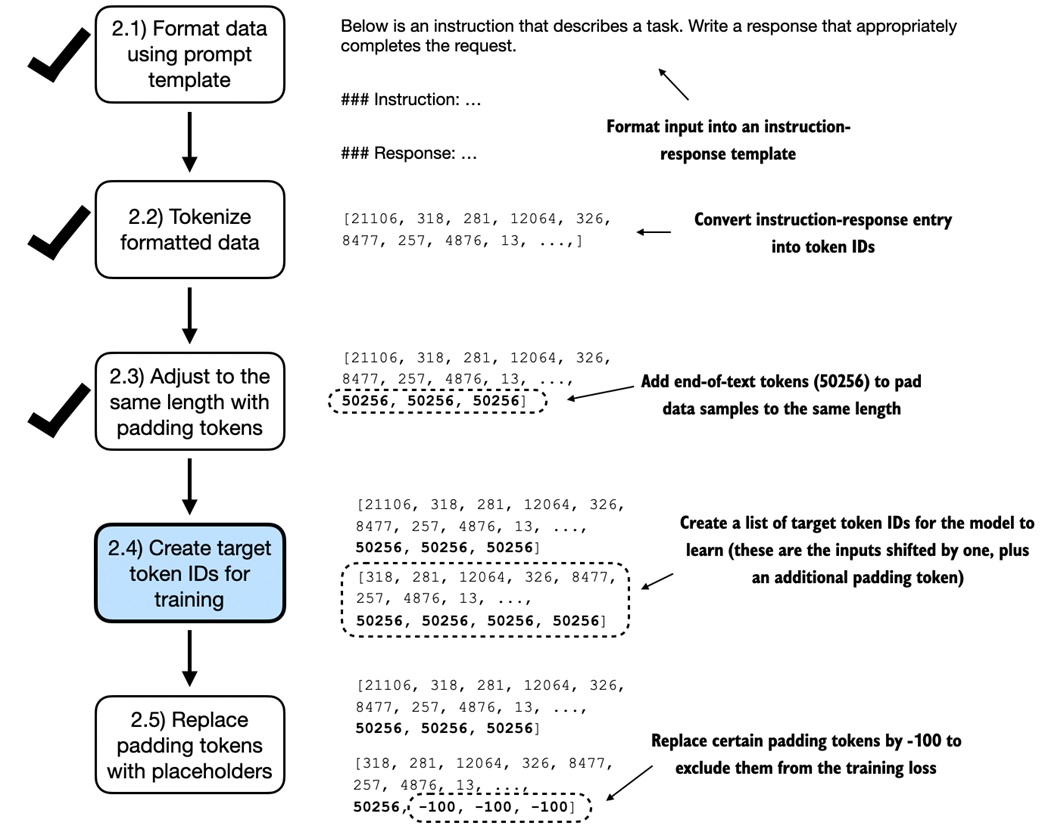
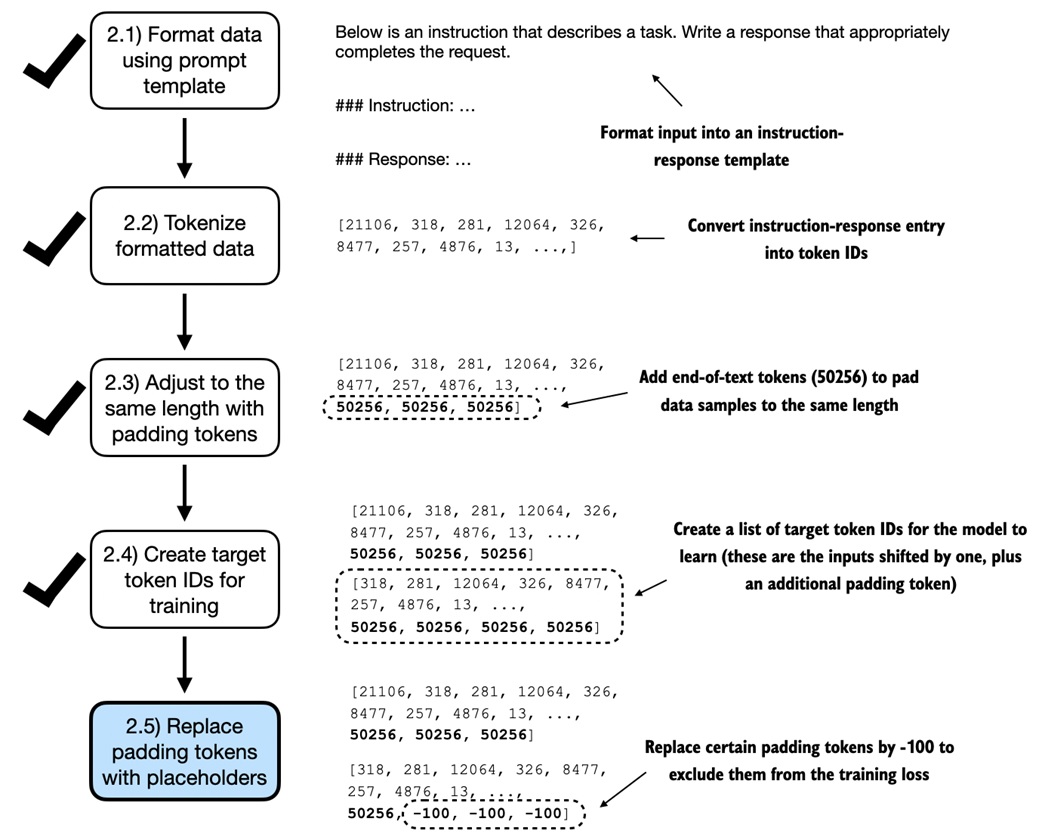
The custom batching process does five things:
1. receive tokenized examples
2. find the longest example in the batch
3. pad shorter examples with token ID 50256
4. create targets by shifting one token forward
5. replace padding targets with -100
The padding token is GPT-2's end-of-text token:
Pad within each batch
The notebook does not pad every dataset item to one global maximum length. It pads only to the longest item in the current batch:
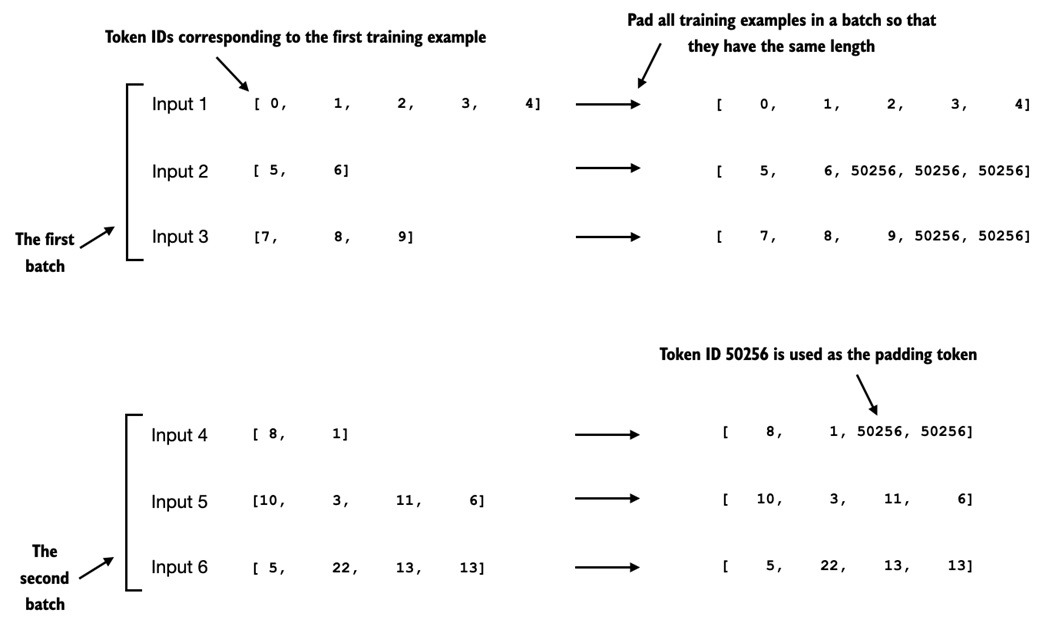
That saves compute.
batch 1 longest example: 61 tokens -> pad batch 1 to 61
batch 2 longest example: 76 tokens -> pad batch 2 to 76
Different batches can have different sequence lengths. That is fine because each batch is processed separately.
Create shifted targets
Instruction finetuning still uses next-token prediction.
For a padded sequence:
The target is the same sequence shifted one position forward:
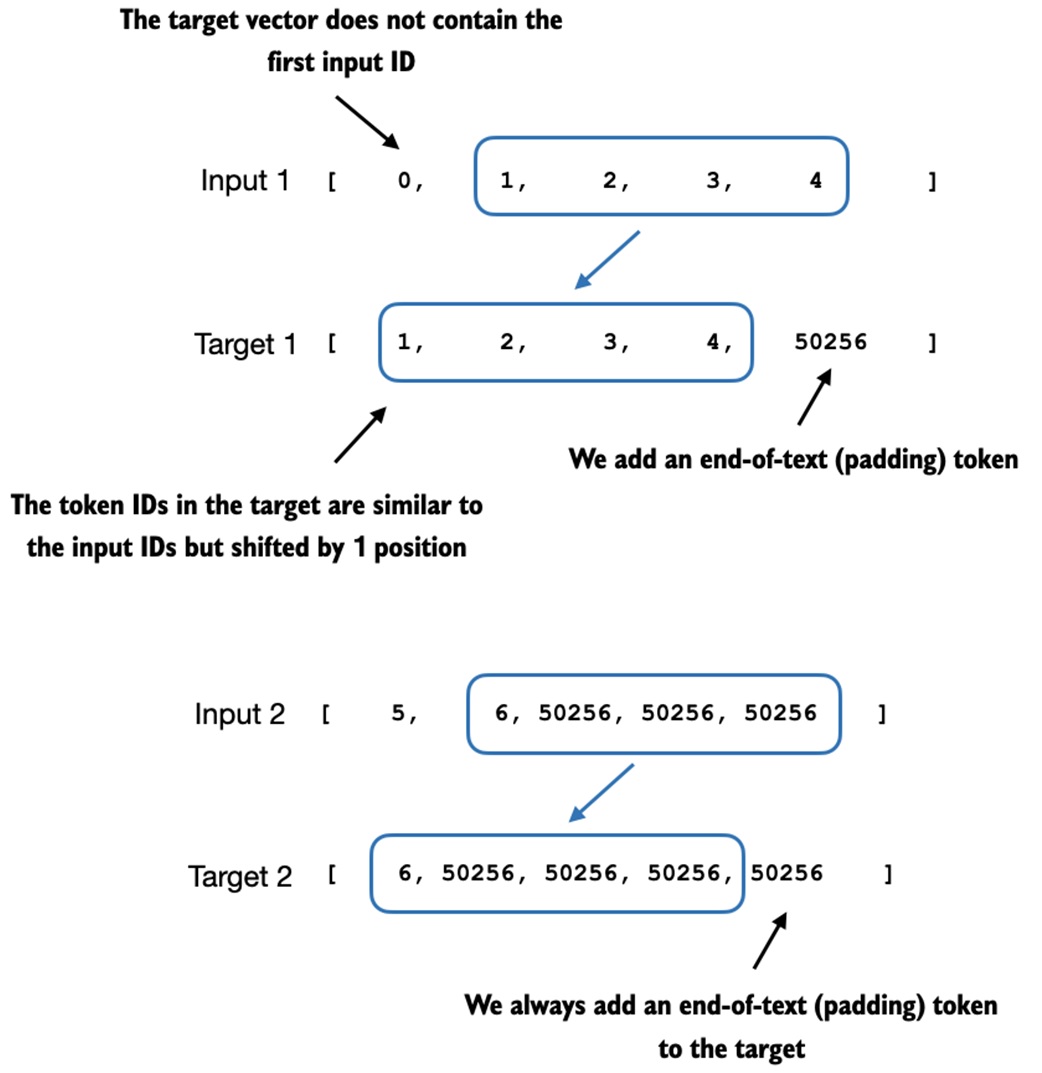
This lets the model learn to predict the response text one token at a time.
Ignore padding in the loss
Padding is useful for batching, but it should not teach the model anything.
The notebook replaces most padding tokens in the targets with -100:
PyTorch cross-entropy ignores target value -100 by default:
Plain interpretation:
target token is a real response token -> contributes to loss
target token is -100 -> ignored by loss
One end-of-text target token is kept:
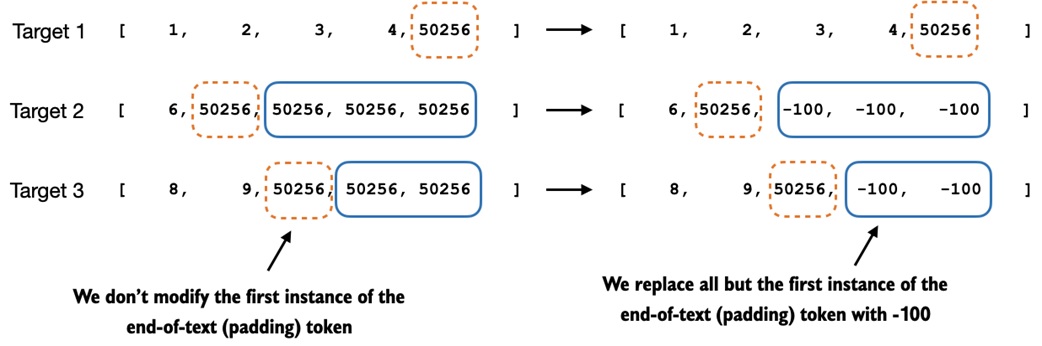
That teaches the model to end its response.
Final collate function
The final collate function has the important knobs:
def custom_collate_fn(
batch,
pad_token_id=50256,
ignore_index=-100,
allowed_max_length=None,
device="cpu",
):
batch_max_length = max(len(item) + 1 for item in batch)
inputs_lst, targets_lst = [], []
for item in batch:
new_item = item.copy()
new_item += [pad_token_id]
padded = new_item + [pad_token_id] * (batch_max_length - len(new_item))
inputs = torch.tensor(padded[:-1])
targets = torch.tensor(padded[1:])
mask = targets == pad_token_id
indices = torch.nonzero(mask).squeeze()
if indices.numel() > 1:
targets[indices[1:]] = ignore_index
if allowed_max_length is not None:
inputs = inputs[:allowed_max_length]
targets = targets[:allowed_max_length]
inputs_lst.append(inputs)
targets_lst.append(targets)
return torch.stack(inputs_lst).to(device), torch.stack(targets_lst).to(device)
The notebook uses functools.partial to pre-fill the device and maximum length:
Then each DataLoader receives that collate function:
train_loader = DataLoader(
    train_dataset,
    batch_size=8,
    collate_fn=customized_collate_fn,
    shuffle=True,
    drop_last=True,
)
Load GPT-2 medium
The notebook loads pretrained GPT-2 weights into the course GPTModel implementation.
For instruction finetuning it chooses GPT-2 medium:
The reason is practical: GPT-2 small can run faster, but it is too weak to produce reasonable instruction-following behavior in this setup.
The loaded model is still mainly a text-completion model. Before finetuning, it may copy or continue the prompt instead of answering the instruction.
Finetune with the existing training loop
The loss helpers and training loop are reused from pretraining:
The model is trained with AdamW:
The notebook trains for 2 epochs:
train_losses, val_losses, tokens_seen = train_model_simple(
    model,
    train_loader,
    val_loader,
    optimizer,
    device,
    num_epochs=2,
    eval_freq=5,
    eval_iter=5,
    start_context=format_input(val_data[0]),
    tokenizer=tokenizer,
)
The training and validation losses drop quickly. The notebook notes that more epochs are not automatically better because overfitting can begin after roughly one epoch.
Extract generated responses
The generate helper returns the original input plus the generated continuation. For evaluation, we only want the response part.
generated_text = token_ids_to_text(token_ids, tokenizer)

response_text = (
    generated_text[len(input_text):]
    .replace("### Response:", "")
    .strip()
)
The model responses are added to the test data:
Then the enriched test set is saved:
The finetuned model weights are also saved:
Evaluate generated answers
Spam classification had an easy metric:
Instruction following is harder. There can be many acceptable responses.
The notebook discusses three evaluation styles:
benchmarks              -> fixed questions and expected answers
human preference tests  -> humans compare responses
LLM-as-judge scoring    -> another model scores the response
The notebook uses the third style with a local model served by Ollama.
The scoring prompt compares:
and asks for a score from 0 to 100:
prompt = (
    f"Given the input `{format_input(entry)}` "
    f"and correct output `{entry['output']}`, "
    f"score the model response `{entry['model_response']}` "
    "on a scale from 0 to 100, where 100 is the best score. "
    "Respond with the integer number only."
)
This produces an approximate average score for the test set. It is useful for comparison, but it is not a perfect truth source. The judging model, prompt, and runtime settings all affect the result.
Common traps
Do not forget that this is still next-token training
Instruction finetuning changes the data format, not the basic language-model objective. The model still predicts the next token in the formatted sequence.
Do not train on padding
Padding tokens are there only to make batch shapes line up. The -100 target value keeps padding from affecting the loss.
Do not remove every end-of-text target
Keeping one end-of-text token teaches the model when a response should stop.
Do not mix prompt formats accidentally
If training uses Alpaca-style markers, inference should use the same style. Inconsistent formatting can make the model look worse than it is.
Do not treat LLM-as-judge scores as objective truth
Automated scoring is useful, but it can be biased by the judging model, wording of the scoring prompt, and nondeterminism in the serving stack.
More epochs are not automatically better
Instruction datasets can be small. If validation loss stops improving or starts separating from training loss, extra training may memorize rather than generalize.
Check yourself
What is the main difference between pretraining and instruction finetuning?
Pretraining teaches next-token prediction on raw text. Instruction finetuning still uses next-token prediction, but the text is formatted as instruction-response examples.
Why does the dataset include an optional input field?
Some tasks need extra content, such as a sentence to rewrite or text to summarize. Other tasks can be answered from the instruction alone.
Why does the notebook use a custom collate function?
Instruction examples have different lengths and need special batching: padding, shifted targets, ignored padding targets, optional truncation, and device placement.
Why is -100 used in the targets?
PyTorch cross-entropy ignores target value -100 by default, so padding positions do not contribute to the training loss.
Why keep one 50256 token in the target sequence?
It teaches the model to generate an end-of-text token when the response is complete.
Why is GPT-2 medium used instead of GPT-2 small?
The notebook uses GPT-2 medium because the smaller model is too limited to produce qualitatively useful instruction-following behavior in this setup.
Why is evaluation harder here than in spam classification?
Spam classification has fixed labels, so accuracy is straightforward. Instruction responses are open-ended, so multiple answers can be acceptable and quality is harder to score.
Source anchors
notebooks/Module2/18-Instruction Finetuning.ipynbstudy-guide/drafts/18-instruction-finetuning.md