Evaluating Reasoning Models
Why this matters
Reasoning models can sound convincing while still giving wrong answers.
This lesson builds a verifier for math problems:
The key point is that evaluation should check whether the answer is correct, not whether the explanation sounds fluent.
Mental model
A verifier is a programmatic judge for tasks with checkable answers.
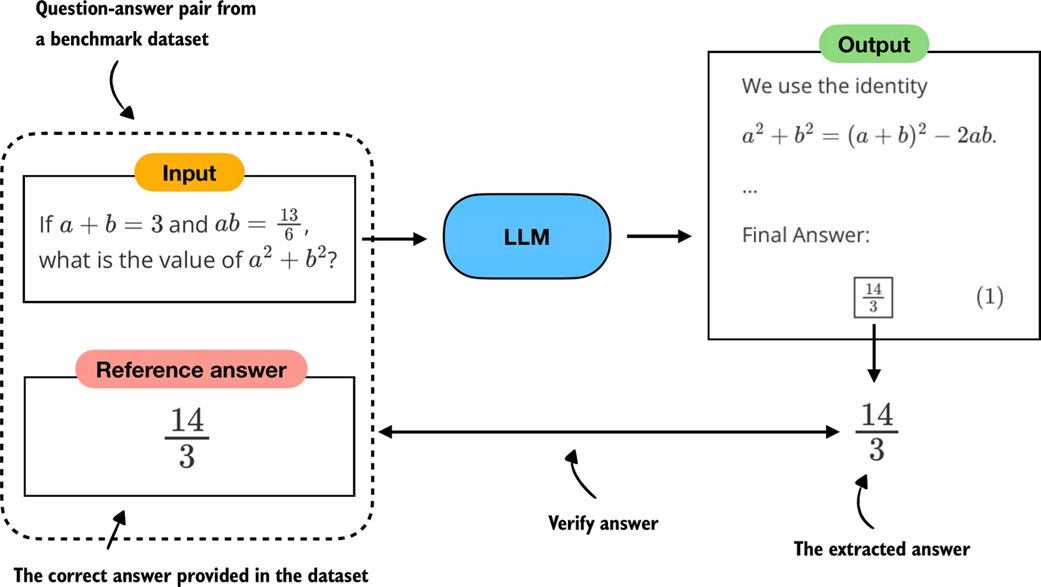
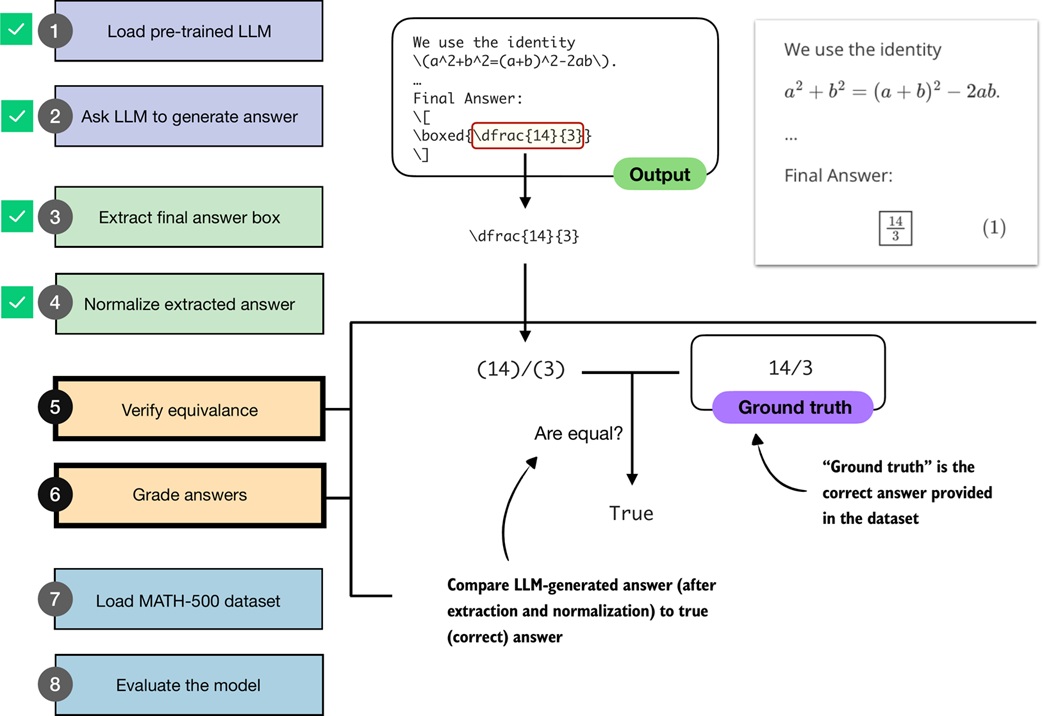
For math, a verifier can compare the model's final answer with a reference answer. The model may write 14/3, \frac{14}{3}, or (28)/(6), but those should all be treated as the same value when appropriate.
Core ideas
- LLM evaluation can be benchmark-based or judgment-based.
- Multiple choice, verifiers, leaderboards, and LLM judges are common evaluation styles.
- Verifiers are especially useful when answers can be checked deterministically.
- Math and code are good verifier domains because correctness can often be computed.
- Evaluation needs answer extraction before answer checking.
- Boxed answers are a common convention in math benchmarks.
- Normalization rewrites different answer formats into a comparable form.
- Direct string comparison is too brittle for math.
- SymPy can parse and simplify expressions to check mathematical equivalence.
- Multi-part answers need to be split and checked part by part.
- MATH-500 is a benchmark dataset of 500 math problems.
- Prompt templates can improve extraction consistency but can also change model behavior.
Walkthrough
Evaluation methods
The notebook starts by separating common evaluation styles.
Benchmark-based evaluation uses fixed tasks and reference answers:
Judgment-based evaluation uses humans or another model to judge response quality:
Four common forms:
multiple choice -> choose A/B/C/D
verifier        -> program checks answer
leaderboard     -> standardized public benchmark
LLM judge       -> another model scores the response
This notebook focuses on verifier-based evaluation for math.
The math verifier pipeline
The full pipeline has several steps:
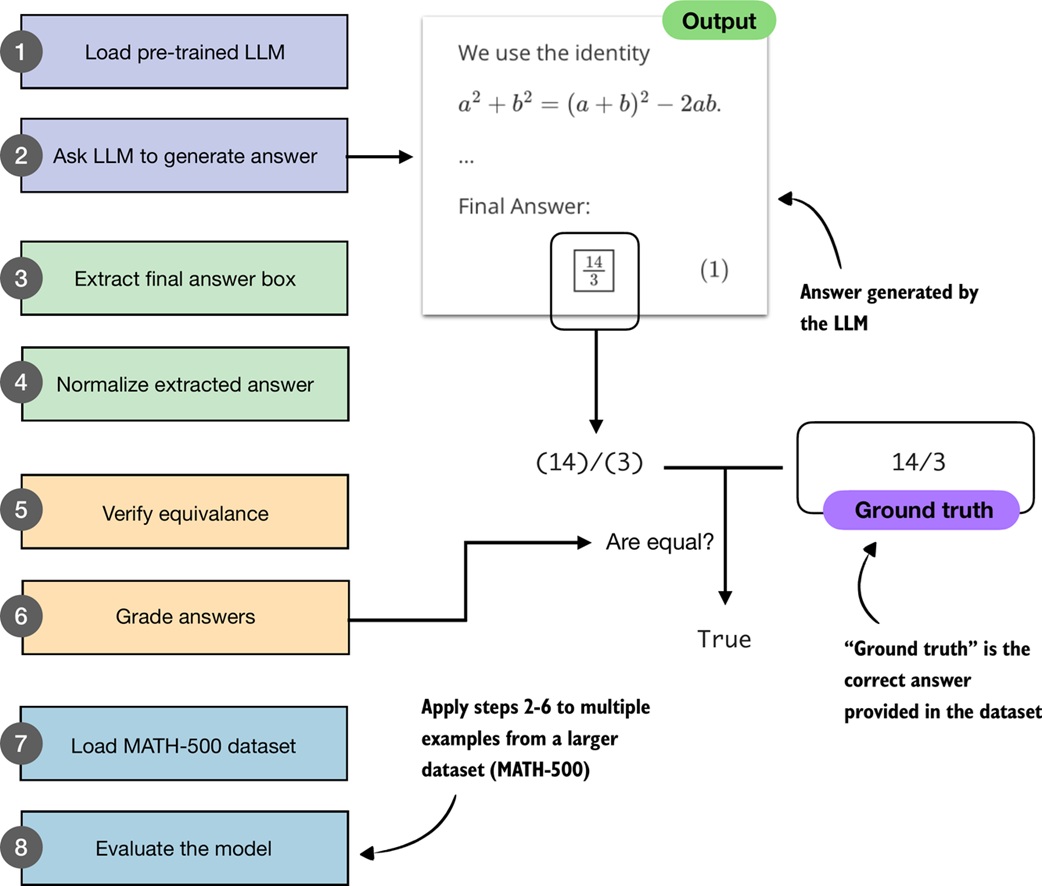
1. load model and tokenizer
2. generate a response
3. extract the final answer candidate
4. normalize the candidate
5. compare with ground truth
6. grade as correct or incorrect
7. repeat over a dataset
8. compute accuracy
This is useful because the model's reasoning text can vary, but the final answer should still be checkable.
Load the model
The notebook reuses the Qwen3 loading flow from lesson 19a.
It supports two variants:
The base model is loaded by default. The reasoning model can be loaded for comparison.
The important teaching point is not the exact download code. It is that both models can be evaluated through the same verifier pipeline.
Generate and collect an answer
The notebook uses a streaming generation function:
for token in generate_text_basic_stream_cache(
    model=model,
    token_ids=input_token_ids_tensor,
    max_new_tokens=2048,
    eos_token_id=tokenizer.eos_token_id,
):
    decoded_id = tokenizer.decode(token.squeeze(0).tolist())
    print(decoded_id, end="", flush=True)
    all_token_ids.append(token.squeeze(0))
This does two things:
- prints tokens as they are produced
- stores tokens so the complete response can be decoded later
Streaming is helpful because reasoning outputs can be long. Without streaming, a model may look stuck even though it is still generating.
Use a generation wrapper
To avoid repeating tokenization and decoding code, the notebook wraps generation:
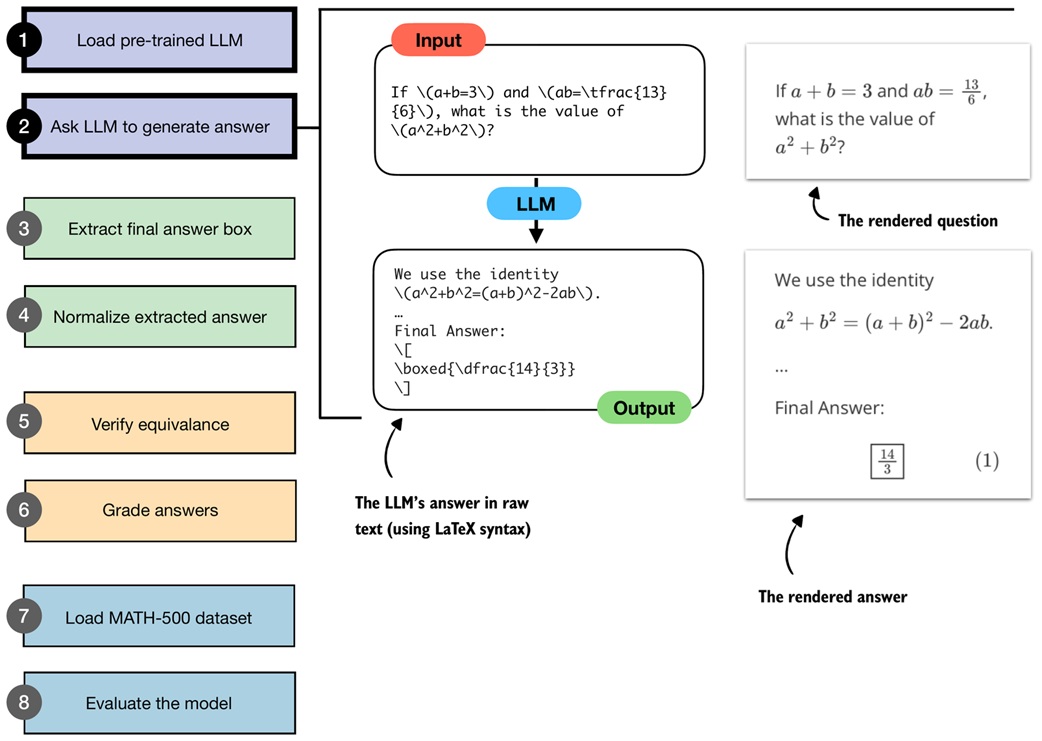
def generate_text_stream_concat(
    model,
    tokenizer,
    prompt,
    device,
    max_new_tokens,
    verbose=False,
):
    input_ids = torch.tensor(
        tokenizer.encode(prompt),
        device=device,
    ).unsqueeze(0)

    generated_ids = []

    for token in generate_text_basic_stream_cache(
        model=model,
        token_ids=input_ids,
        max_new_tokens=max_new_tokens,
        eos_token_id=tokenizer.eos_token_id,
    ):
        next_token_id = token.squeeze(0)
        generated_ids.append(next_token_id.item())

        if verbose:
            print(tokenizer.decode(next_token_id.tolist()), end="", flush=True)

    return tokenizer.decode(generated_ids)
The wrapper turns:
into:
Extract the boxed answer
Math benchmarks often ask models to write the final answer in a box:
The notebook writes a parser that extracts the content inside the last boxed expression:
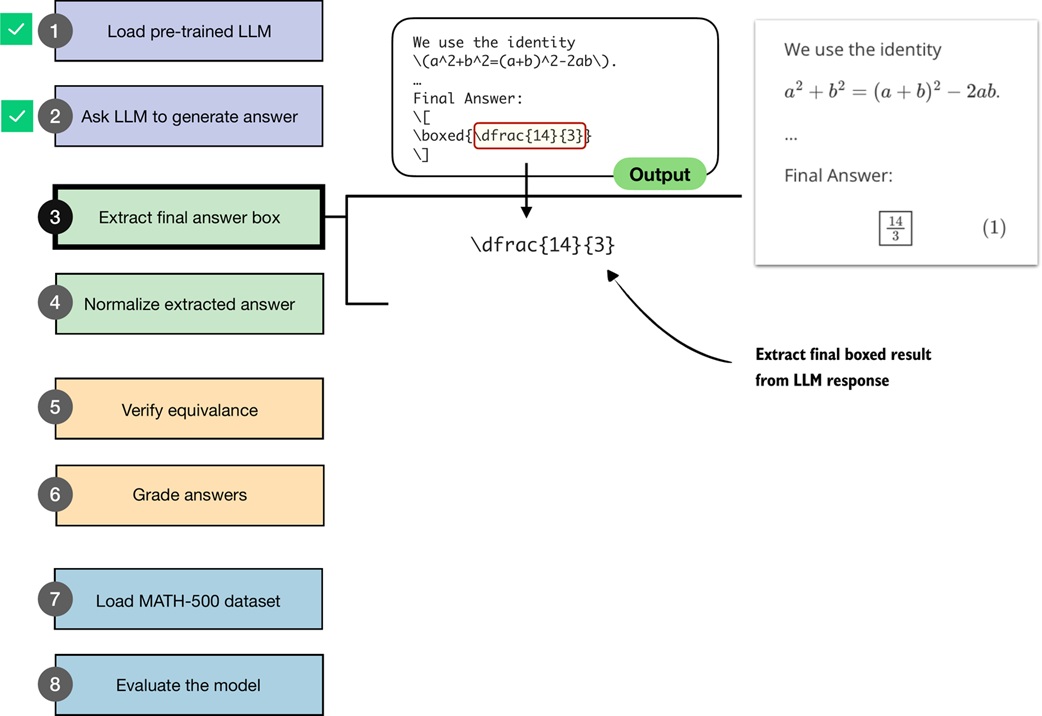
def get_last_boxed(text):
    boxed_start_idx = text.rfind(r"\boxed")
    if boxed_start_idx == -1:
        return None

    current_idx = boxed_start_idx + len(r"\boxed")

    while current_idx < len(text) and text[current_idx].isspace():
        current_idx += 1

    if current_idx >= len(text) or text[current_idx] != "{":
        return None

    current_idx += 1
    brace_depth = 1
    content_start_idx = current_idx

    while current_idx < len(text) and brace_depth > 0:
        char = text[current_idx]
        if char == "{":
            brace_depth += 1
        elif char == "}":
            brace_depth -= 1
        current_idx += 1

    if brace_depth != 0:
        return None

    return text[content_start_idx:current_idx - 1]
Why the brace-depth logic matters:
The answer contains nested braces. A simple “read until first closing brace” parser would stop too early.
Fallback extraction
Not every model response contains a clean boxed answer.
The notebook adds a fallback extractor:
def extract_final_candidate(text, fallback="number_then_full"):
    result = ""

    if text:
        boxed = get_last_boxed(text.strip())
        if boxed:
            result = boxed.strip()
        elif fallback in ("number_then_full", "number_only"):
            matches = RE_NUMBER.findall(text)
            if matches:
                result = matches[-1]
            elif fallback == "number_then_full":
                result = text

    return result
Fallback modes:
number_then_full -> use boxed answer, else last number, else full text
number_only      -> use boxed answer, else last number, else empty
none             -> use boxed answer only
Fallbacks are useful for analysis, but they can also create false confidence. If the model gives a messy response, the extractor might pick a number that was not intended as the final answer.
Normalize answer text
The same answer can be written many ways:
Normalization rewrites those into a consistent form.
The notebook's normalize_text function strips or rewrites things such as:
- chat special tokens
- extra math delimiters
\leftand\right- degree symbols
\dfracand\tfrac\sqrt{...}\frac{a}{b}- unicode superscripts
- thousands separators
Plain goal:
Normalization is not the same as proving correctness. It prepares the text for a better checker.
Check mathematical equivalence
String comparison is too strict:
Mathematically, those are equal.
The notebook uses SymPy:
from sympy import simplify

def equality_check(expr_gtruth, expr_pred):
    if expr_gtruth == expr_pred:
        return True

    gtruth = sympy_parser(expr_gtruth)
    pred = sympy_parser(expr_pred)

    if gtruth is not None and pred is not None:
        try:
            return simplify(gtruth - pred) == 0
        except (SympifyError, TypeError):
            pass

    return False
The important check is:
If the difference simplifies to zero, the expressions are equivalent.
Examples:
Handle multi-part answers
Some answers contain multiple parts:
A single expression checker may fail on tuples. The notebook splits tuple-like answers:
def split_into_parts(text):
    if (
        text
        and len(text) >= 2
        and text[0] in "([" and text[-1] in ")]"
        and "," in text[1:-1]
    ):
        items = [p.strip() for p in text[1:-1].split(",")]
        if all(items):
            return items

    return [text] if text else []
Then it grades part by part:
def grade_answer(pred_text, gt_text):
    result = False

    if pred_text is not None and gt_text is not None:
        gt_parts = split_into_parts(normalize_text(gt_text))
        pred_parts = split_into_parts(normalize_text(pred_text))

        if gt_parts and pred_parts and len(gt_parts) == len(pred_parts):
            result = all(
                equality_check(gt, pred)
                for gt, pred in zip(gt_parts, pred_parts)
            )

    return result
This makes comparisons such as these work:
Order matters in this implementation.
Test the verifier itself
Before using a verifier to judge a model, test the verifier.
The notebook checks examples such as:
3/4                 vs \frac{3}{4} -> correct
\frac{\sqrt{8}}{2}  vs sqrt(2)     -> correct
0.3333333333        vs 1/3         -> incorrect
1,234/2             vs 617         -> correct
90^\circ            vs 90          -> correct
This is important because verifier bugs become evaluation bugs. A bad verifier can make a weak model look strong or a strong model look weak.
Load MATH-500
MATH-500 is a benchmark of 500 math problems.
Each entry has the key fields:
problem  -> question for the model
answer   -> reference final answer
solution -> worked solution, not used here
The notebook loads it as JSON:
The verifier only needs problem and answer.
Prompt the model for boxed answers
The evaluation pipeline expects boxed final answers, so the notebook uses a prompt template:
def render_prompt(prompt):
    template = (
        "You are a helpful math assistant.\n"
        "Answer the question and write the final result on a new line as:\n"
        "\\boxed{ANSWER}\n\n"
        f"Question:\n{prompt}\n\nAnswer:"
    )
    return template
This makes extraction easier, but there is a trade-off.
The notebook observes that a prompt template can change model behavior. In one example, a short boxed answer was easy to extract but incorrect, while an earlier untemplated response was longer and correct.
Conclusion:
It must be chosen and reported carefully.
Mini evaluation demo
Before running the full benchmark, the notebook tests the pipeline on one example:
def mini_eval_demo(model, tokenizer, device):
    ex = {
        "problem": "Compute 1/2 + 1/6.",
        "answer": "2/3",
    }

    prompt = render_prompt(ex["problem"])
    gen_text = generate_text_stream_concat(
        model, tokenizer, prompt, device, max_new_tokens=64
    )

    pred_answer = extract_final_candidate(gen_text)
    is_correct = grade_answer(pred_answer, ex["answer"])

    print(f"Prediction: {pred_answer}")
    print(f"Ground truth: {ex['answer']}")
    print(f"Correct: {is_correct}")
This checks the whole chain:
Evaluate over MATH-500
The final evaluator repeats the mini-demo over many examples:
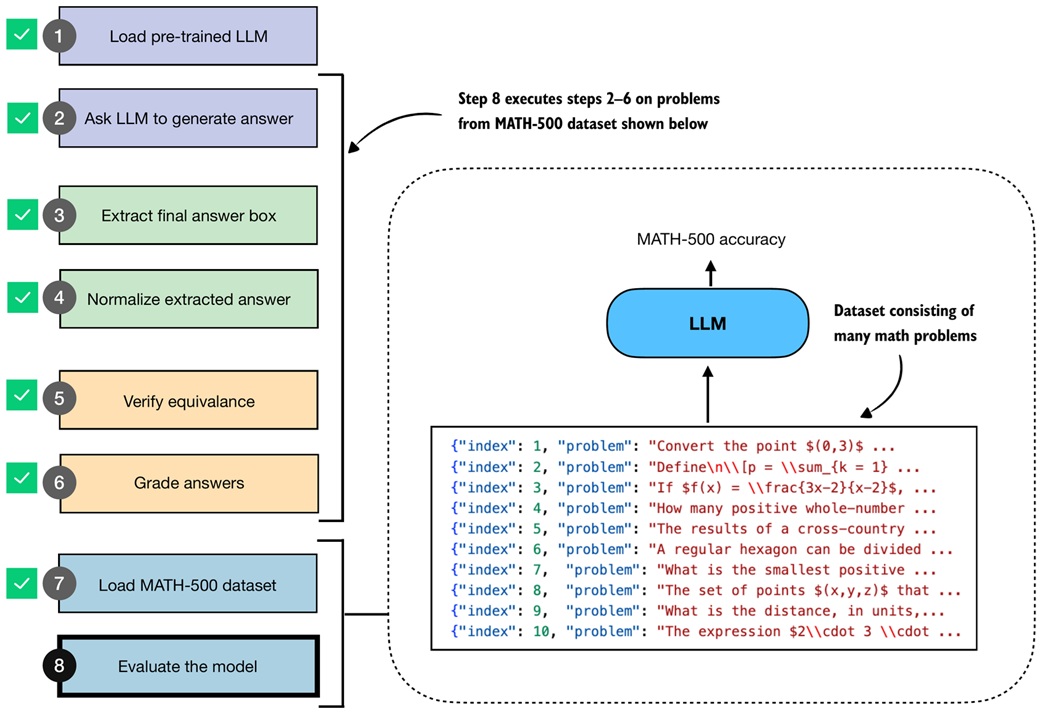
For each entry:
The function also writes results to a JSONL file so wrong answers can be inspected later.
The notebook runs the first 10 MATH-500 examples:
num_correct, num_examples, acc = evaluate_math500_stream(
    model,
    tokenizer,
    device,
    math_data=math_data[:10],
    max_new_tokens=2048,
    verbose=False,
)
The base model scores low on this small sample. The reasoning model variant performs better. The notebook also notes that changing tokenizer chat-template behavior can significantly change results, which is another reminder that evaluation setup matters.
Common traps
Do not evaluate only by how convincing the reasoning sounds
A fluent derivation can still end with the wrong answer. The final answer needs to be checked.
Do not rely on exact string matching for math
14/3, (14)/(3), and 28/6 can represent the same value. Symbolic or numeric equivalence checks are often needed.
Do not trust extraction blindly
If the model does not clearly mark its final answer, fallback extraction may pick the wrong number from the explanation.
Do not forget to test the verifier
The verifier is code, and code can be wrong. Verifier mistakes directly corrupt model accuracy results.
Do not hide the prompt template
Prompt wording can change model behavior and accuracy. The template is part of the evaluation method.
Do not compare models under different settings
Model variant, tokenizer settings, max tokens, device behavior, and prompt format should be controlled when comparing results.
Do not assume MATH-500 is unseen
Public benchmark data may have appeared in training data for modern LLMs. Treat benchmark scores as useful but not absolute proof of reasoning ability.
Check yourself
Why are math problems useful for verifier-based evaluation?
Many math answers can be checked deterministically, so the verifier can compare the model's final answer to a reference answer.
Why does the notebook extract boxed answers?
Boxed answers give a consistent place to find the model's final answer, making automated extraction easier.
Why is normalization needed before checking answers?
Models can write the same answer in many formats. Normalization removes formatting differences before comparison.
Why is direct string comparison not enough?
Mathematically equivalent expressions can look different as strings, such as 14/3 and 28/6.
What does SymPy add to the verifier?
SymPy parses expressions and can simplify their difference to check mathematical equivalence.
Why does the grader split tuple-like answers?
Multi-part answers need each component checked separately. A single expression comparison may not handle tuples correctly.
Why save generated responses to JSONL?
Saved responses let you inspect failures, debug extraction, and understand whether errors came from generation or verification.
Source anchors
notebooks/Module2/19b-Evaluating Reasoning Models.ipynbstudy-guide/drafts/19b-evaluating-reasoning-models.md